
Landlord Registration
Everyone who owns residential and/or multi-unit rental properties in the City of South Bend, which they do not personally occupy, must register their rental properties with DCI-Neighborhoods on or before September 1st of every year. NOTE – Registration is intended for property OWNERS only. If you are a property manager, or other agent for the owner, please instruct the property owner to complete the registration.
If you have questions about how to complete the registration, please refer to the “How to Register” and “Frequently Asked Questions” sections of this webpage. If you are still having issues, you may reach out to landlordregistration@southbendin.gov for assistance.
Deadline to register is October 10, 2025 or you will be subject to a $300 fine
Complete Landlord Registration
How to Register
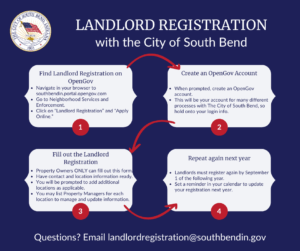
Find Landlord Registration on OpenGov
- Navigate in your browser to southbendin.portal.opengov.com
- Go to Neighborhood Services and Enforcement.
- Click on “Landlord Registration” and “Apply Online.
Create an OpenGov Account
- When prompted, create an OpenGov account.
- This will be your account for many different processes with The City of South Bend, so hold onto your login info.
Fill out the Landlord Registration
- Property Owners ONLY can fill out this form.
- Have contact and location information ready.
- You will be prompted to add additional locations as applicable.
- You may list Property Managers for each location to manage and update information.
Repeat again next year
- Landlords must register again by September 1 of the following year.
- Set a reminder in your calendar to update your registration next year.
Owners/landlords can register unlimited properties, assign property managers, and update their information throughout the year. Issues and feedback should be submitted to landlordregistration@southbendin.gov.
If you need help navigating the new portal, please refer to these videos for support.
If you are struggling to navigate the portal, please feel free to visit City Hall in person to receive assistance from City Staff.
How to Complete Landlord Registration Video (English)
Vídeo sobre cómo completar el registro de propietario (en español)
How to Update Your Property
To make updates to your account:
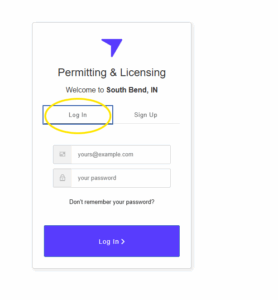
- Sign in to your account from the login page where it says “Apply Online”
-
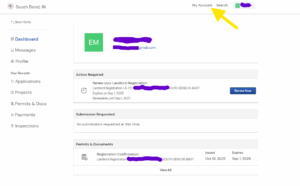
Navigate to “My Account” at the top right of the page.
-
Select “Renew Now”
Housing Discrimination
If you think you may be a victim of housing discrimination, please visit the South Bend Human Rights Commission.
Frequently Asked Questions
It is required that you put all of your properties on one account if they share the same landlord and property manager. Do not create separate accounts.
100 properties can be registered in the same account if they have the same owner and property manager.
If you are the landlord and manage some properties but use a property manager for a portion of your portfolio, you need to complete multiple separate registrations to accurately reflect your complete portfolio. You can use the same email address for the subsequent accounts.
Your landlord registration is not publicly available; however a public records request would require us to release the information.
The system only saves the most current information as your registration. If you are adding new properties, you must re-add all previous active properties in the update. Any change in property manager, adding or deleting properties, must be done by the Landlord.
The Landlord will clink on the RENEW button to update the registration. This will be accessible on Friday, Oct 17, 2025. Please email landlordregistration@southbendin.gov if you need to update your Landlord Registration before this date.
No, you must provide an actual physical personal or business property address.
It is the owner’s responsibility to update their information on the website to maintain compliance with the ordinance.
The City is required to send correspondence to the legal owner of record at the legal address recorded with the County.
To ensure the property owner receives all communications related to the property, they are responsible for maintaining accurate information on file with the County. The address of record can be updated by visiting Form Center • St. Joseph County, IN • CivicEngage (sjcindiana.com) or by calling 574-235-9668.
The registration is valid for one year and must be renewed each year prior to September 1st. Failure to renew your registration is subject to a penalty of $300.
Yes, our new registration portal will allow you to only need to update the information you provided the year prior.
You will need to create an email address. There are many free email programs to easily create one. This will need to be done prior to you beginning your registration.
Failure to register will result in a $300 civil penalty for each rental unit or rental unit community in violation.
Your rental property is located in the county, outside of city limits, therefore does not fall under the City Ordinance. Registration is not necessary.